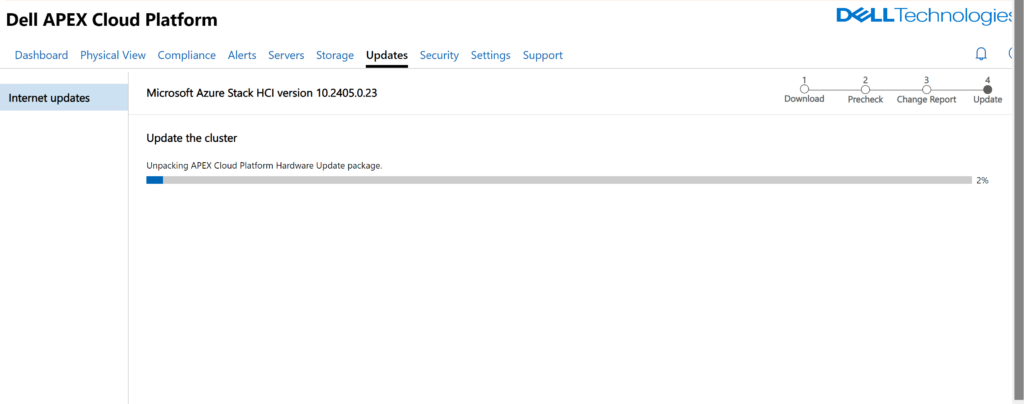
Error Updating to Microsoft Azure Stack HCI version 10.2405.0.23 Dell Apex Cloud
After my first error that got resolved i ran into a second error upgrading at this step.

The cluster update failed. Type ‘UpdateArbAndExtensions’ of Role ‘MocArb’ raised an exception: [UpgradeArbAndExtensions :arcappliance upgrade] Failed with Error C:\Program Files (x86)\Microsoft SDKs\Azure\CLI2\wbin\az.cmd arcappliance upgrade hci –config-file “C:\ClusterStorage\Infrastructure_1\Shares\SU1_Infrastructure_1\MocArb\WorkingDirectory\Appliance\hci-appliance.yaml” –only-show-errors returned a non empty error stream [ERROR: { “errorCode”: “InvalidEntityError”, “errorResponse”: “{\n\”message\”: \”the cloud fabric (MOC) is currently at version v0.13.1. A minimum version of 0.15.0 is required for compatibility\”\n}” }] at [at Invoke-ArcHciAzCommandLine, C:\Program Files\WindowsPowerShell\Modules\ArcHci\0.2.50\archci.psm1: line 3134 at Invoke-ArcHciAzCommand, C:\Program Files\WindowsPowerShell\Modules\ArcHci\0.2.50\archci.psm1: line 3010 at UpgradeArbAndExtensionsInternal, C:\NugetStore\Microsoft.AzureStack.MocArb.LifeCycle.1.2405.0.10\content\Scripts\MocArbHelper.psm1: line 2109 at UpdateArbAndExtensions, C:\NugetStore\Microsoft.AzureStack.MocArb.LifeCycle.1.2405.0.10\content\Scripts\MocArbLifeCycleManager.psm1: line 264 at , C:\Agents\Microsoft.AzureStack.Solution.ECEWinService.10.2405.0.348\content\ECEWinService\InvokeInterfaceInternal.psm1: line 134 at Invoke-EceInterfaceInternal, C:\Agents\Microsoft.AzureStack.Solution.ECEWinService.10.2405.0.348\content\ECEWinService\InvokeInterfaceInternal.psm1: line 130] Command Arguments ——- ——— UpgradeArbAndExtensionsInternal {Parameters=CloudEngine.Configurations.EceInterfaceParameters} {} {CloudEngine.Configurations.EceInterfaceParameters, MocArb, UpdateArbAndExtensions, C… Invoke-EceInterfaceInternal {CloudDeploymentModulePath=C:\NugetStore\Microsoft.AzureStack.Solution.Deploy.CloudDe… at at Trace-Error, C:\NugetStore\Microsoft.AzureStack.MocArb.LifeCycle.1.2405.0.10\content\Scripts\Common\Tracer.psm1: line 63 at UpgradeArbAndExtensionsInternal, C:\NugetStore\Microsoft.AzureStack.MocArb.LifeCycle.1.2405.0.10\content\Scripts\MocArbHelper.psm1: line 2112 at UpdateArbAndExtensions, C:\NugetStore\Microsoft.AzureStack.MocArb.LifeCycle.1.2405.0.10\content\Scripts\MocArbLifeCycleManager.psm1: line 264 at , C:\Agents\Microsoft.AzureStack.Solution.ECEWinService.10.2405.0.348\content\ECEWinService\InvokeInterfaceInternal.psm1: line 134 at Invoke-EceInterfaceInternal, C:\Agents\Microsoft.AzureStack.Solution.ECEWinService.10.2405.0.348\content\ECEWinService\InvokeInterfaceInternal.psm1: line 130 Command Arguments ——- ——— UpgradeArbAndExtensionsInternal {Parameters=CloudEngine.Configurations.EceInterfaceParameters} {} {CloudEngine.Configurations.EceInterfaceParameters, MocArb, UpdateArbAndExtensions, C… Invoke-EceInterfaceInternal {CloudDeploymentModulePath=C:\NugetStore\Microsoft.AzureStack.Solution.Deploy.CloudDe… at Trace-Error, C:\NugetStore\Microsoft.AzureStack.MocArb.LifeCycle.1.2405.0.10\content\Scripts\Common\Tracer.psm1: line 63 at UpgradeArbAndExtensionsInternal, C:\NugetStore\Microsoft.AzureStack.MocArb.LifeCycle.1.2405.0.10\content\Scripts\MocArbHelper.psm1: line 2351 at UpdateArbAndExtensions, C:\NugetStore\Microsoft.AzureStack.MocArb.LifeCycle.1.2405.0.10\content\Scripts\MocArbLifeCycleManager.psm1: line 264 at ,
Resolution was to go onto any Azure Stack HCI Node and run these commands. These commands update MOC to its latest version and then verify its on the latest version.
UPDATE-MOC
THEN RUN
GET-MOCVERSION